GIT-GITHUB
git : 소스코드 저장(=버전관리), 소스코드 공유, 협업공간
어제 배웠던 github에 프로젝트 올려 보았다.
처음엔 강사님 유튜브를 보다가 줌 강의 내용이랑 다른게 나와 키만 내려받고 이게 뭐지 하고 넘기고
참고는 유튜브 : 코딩알려주는누나 꺼를 보고 따라하던 중
git에 push를 할 시 계속 에러가 났다.
PS C:\Users\82103\Desktop\study\sparta\02.main_camp\first project\01.Introduction> git push origin main
error: failed to push some refs to 'github.com:pomcrap/test1.git'
처음에는'git push origin (branch이름)' 으로 해야 한다길래 'git push origin master' 로 따라해서 그런가? 하고 다시 해봤지만 여전히 안됨.
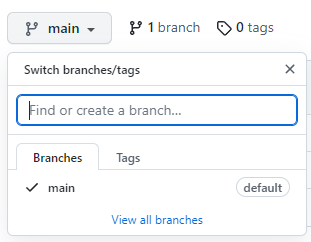
그러다 강의중 SSH가 연결이 바로 안 되게 막혀 있다고 말씀하신게 떠올라서 다시 강사님껄(유튜브) 보니 내려 받은 키번호를 git에 등록 해줌. 그 뒤에는 다른 프로그램과 연동 시키던데 어떤것인지 모르겠다. 제목에 쓰여져 있는 소스트리 란 프로그램인지는 오전상담때 성원매니저님이 보여주신 프로그램과 같은 것 같아 여쭤봐야겠다.
@app.route("url")
라우트는 특정주소 입력시, 특정함수가 실행되게 해주는 역할을 한다. (참고)
부트스트랩 버튼 크기 설정
<button onclick="del_comment(${i})" type="button" class="btn btn-dark btn-sm ">삭제</button>class=" 스타일클래스 btn-sm or lg " 로 버튼크기 조절이 가능하다.
오늘 한 내용
1.담임 매니저님, 튜터님 상담
2. git, github를 로컬저장소(?)와 연결 하였다.
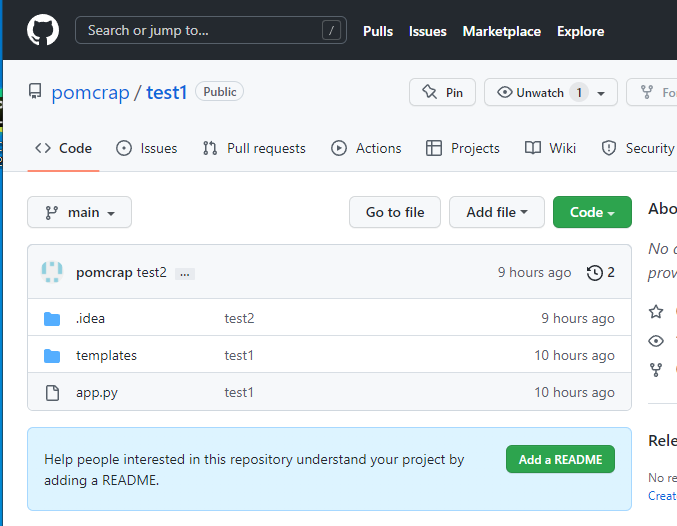
3.방명록을 db연결하여 등록, 삭제
<head>
<script>
function save_comment(){
            let name=$('#name').val()
            let comment=$('#comment').val()

            $.ajax({
                type: 'POST',
                url: '/03.testback',
                data: {name_give:name, comment_give:comment},
                success: function (response) {
                    alert(response['msg'])

                    window.location.reload()
                }
            })
        }
        function show_comment(){
            $.ajax({
                type: "GET",
                url: "/03.testback",
                data: {},
                success: function (response) {
                    let rows = response['pe']
                    console.log(rows)
                    for(let i=0; i < rows.length; i++){
                        // let id = rows[i]['_id']
                        // console.log(id)
                        let name = rows[i]['name']
                        let comment = rows[i]['comment']


                        let temp_html=`<div class="card">
                                            <div class="card-body">
                                                <blockquote class="blockquote mb-0">
                                                    <p id="${i}_comment">${comment}</p>
                                                    <footer id="${i}_name" class="blockquote-footer">${name}</footer>
                                                    <button onclick="rev_comment()" type="button" class="btn btn-secondary btn-sm">수정</button>
                                                    <button onclick="del_comment(${i})" type="button" class="btn btn-dark btn-sm ">삭제</button>

                                                </blockquote>
                                            </div>
                                       </div>`
                        $('#comment-list').append(temp_html)
                    }

                }
            });
        }
        function del_comment(i){

            let num=i
            let name= document.getElementById(`${num}_name`).innerText
            let comment=document.getElementById(`${num}_comment`).innerText

            console.log(name, comment)

            $.ajax({
                type: 'POST',
                url: '/03.testback/del',
                data: {name_give:name, comment_give:comment},
                success: function (response) {
                    alert(response['msg'])

                    window.location.reload()
                }
            })
        }
</script>
</head>
@app.route("/03.testback", methods=["POST"])
def backtest_insert_post():
    name_receive = request.form['name_give']
    comment_receive = request.form['comment_give']

    doc = {'name': name_receive, 'comment': comment_receive}

    db.testback.insert_one(doc)

    return jsonify({'msg':'작성완료!!'})


@app.route("/03.testback", methods=["GET"])
def backtest_insert_get():
    pe_comment = list(db.testback.find({}, {'_id': False}))
    return jsonify({'pe':pe_comment})


@app.route("/03.testback/del", methods=["POST"])
def backtest_del():
    name_receive = request.form['name_give']
    comment_receive = request.form['comment_give']

    db.testback.delete_one({"name": name_receive, "comment": comment_receive})

    return jsonify({'msg':'삭제완료!!'})
오늘 느낀 점
1. 배경지식이 없어 수업내용을 따라갈수 있을지 매우 걱정된다고 매니저님께 말드렸더니, 매우 많이 신경을 써주셨다. 감사합니다.
2.방명록에서 db에 저장하고 그 내용을 front에 구현하는건 코드 하나하나까지 상세하게 말할수는 없어도 어찌 하였으나 삭제부분은 감조차 오지 않았다. db내용을 인식해야한는데 그 내용을 어찌 인식하지? 하고 물음표를 띄우던 와중 매니저님께서 튜터님과 함께 고민하셔서 해결해 주시는데 괜히 죄송스럽고 감사했다.
3.팀내에서 작업상황공유를 같이 작업하시는 분들끼리 해서 매우 궁금하였는데, 팀장님께 같이 하자고 요청드렸더니 흔쾌히 받아주시고, 그 부분의 내용이 더 커져서 팀내에 코드리뷰까지 해주시는걸로 정해졌다. 이렇게까지 요청드린건 아니였으나, 신경써주시는 점 감사했다.
4.들은 내용은 많고, 머리 속은 뒤죽박죽이고, 지금 너무 졸립다 ㅠ..
5.팀 프로젝트를 하는데, 내가 할수 있는부분은 이미 다 작업하셨어서 할수 있는게 그래도 한번 해보는것과, 정보 주워 날랐다. delete부분을 하는건 감을 못잡았지만!! 그래도 delete.one은 데이터가 하나씩 지워져서 못 알아 차리셨던 카운트를 하여 나온 변수값num으로 방명록구분을 하였는데 그 값에 중복값이 생기는 구조였다. 그런데 그럴경우 중복값 때문에 먼저 등록된 db(?) 사라 진다는 정보를 퍼날랐다. 😅 바로 잡으셨다는데 어떻게 잡으신건지 매우 궁금하다.
내일 할 것.
1.팀원분들 프로젝트 진행상황 파악 및 필수 구현항목에서 빠진 내용있는데 진행방향 문의.
2.담임매니저님이 코드설명해주신다고 했음.
<p id="${i}_comment">${comment}</p>
<footer id="${i}_name" class="blockquote-footer">${name}</footer>
매니저님이 이 부분 이해 되세요? 하고 물을 때 단순하게 i가 위에서 가져와서 매기는거 아닌가? 하고 생각했는데
지금 보니 왜 저런식으로 지정하신건지 이해가 안된다 ㅠㅠ .. id 로지정하는데.. for문의 변수가 적용이..되나?...
그부분에 대해서 문의드릴것..
3
'TIL' 카테고리의 다른 글
| 22.11.05_TIL (0) | 2022.11.06 |
|---|---|
| 22.11.04_TIL_내배캠 (2) | 2022.11.05 |
| 22.11.03_TIL_내배캠 (0) | 2022.11.04 |
| 22.11.02_TIL_내배캠 (0) | 2022.11.03 |
| 22.10.31_TIL_내배캠 (0) | 2022.10.31 |


